Introduction
Daily Dark Web Monitoring is only available to purchase for clients in the MDR Complete service tier.
Daily Dark Web Monitoring is an add-on feature that performs a scan of the dark web daily, and reports and issues or vulnerabilities via ARO. This article covers the following topics:
- Purchasing the Add-On
- What's Monitored?
- Enable Daily Dark Web Monitoring
- Mitigating Risks Associated with Exposed Data
Purchasing the Add-On
You can visit the MDR Portal's Service Overview to see if your organization has the feature enabled or not.
If you are a partner, you can purchase the Daily Dark Web Monitoring add-on via the License Management Portal (LMP). See Purchasing Daily Dark Web Monitoring from the LMP for more on this.
If you are a direct client, please reach out to your Field Effect MDR sales contact.
What's Monitored?
The information Field Effect collects and scans is mainly derived from two sources:
Published Files: These are files published online by threat actors that contain information obtained due to a breach of an organization, website, service, etc. For example, in May 2024, the U.S.-based retailer Neiman Marcus suffered a data breach resulting in the exposure of 31,000,000 unique email addresses, names, phone numbers, dates of birth, physical addresses and partial credit card data.
Info Stealers: These records are derived from files published online that contain information collected by an info stealer. An info stealer is a type of malware whose purpose is to steal information stored in browsers, such as usernames and passwords, credit card information, and cryptocurrency wallets. The information collected by info stealers is often shared and sold on the dark web, for other fraudsters and cyber criminals to leverage for their own purposes. Most of the records derived from an info stealer will contain a username, password (cleartext or hashed) and the URL to the online service it is related to. (For example: test@username.com, P@$$w0Rd, http://test.myemailservice[.]com)
The types of data that the daily scan is looking for includes:
Clear text passwords: this is a term used to refer to any password that is “in the clear”; fully exposed in plain text and available for anyone to purchase and or misuse.
Hashed passwords: These passwords are available to threat actors, but unlike cleartext passwords, these credentials are still encrypted. They are still of use to threat actors, but adds a layer of inconvenience to their attempts, when compared to cleartext.
Financial data: the most common data point in this category are, but not limited to, credit card and bank account numbers.
Personally Identifiable Information (PII): any information that can used with other data to help “triangulate” the identity of a user.
Enable Daily Dark Web Monitoring
After you have purchased the add-on, you must provide your organization's Daily Dark Web Domains in your organization's Service Profile. This is done in the MDR Portal.
To add a domain, it must already be added to your profile as an email domain. See Monitoring Profile: Editing & Updating for more on this.
These domains must already be added to your Service Profile's Email Domains, and there is a limit of 5.
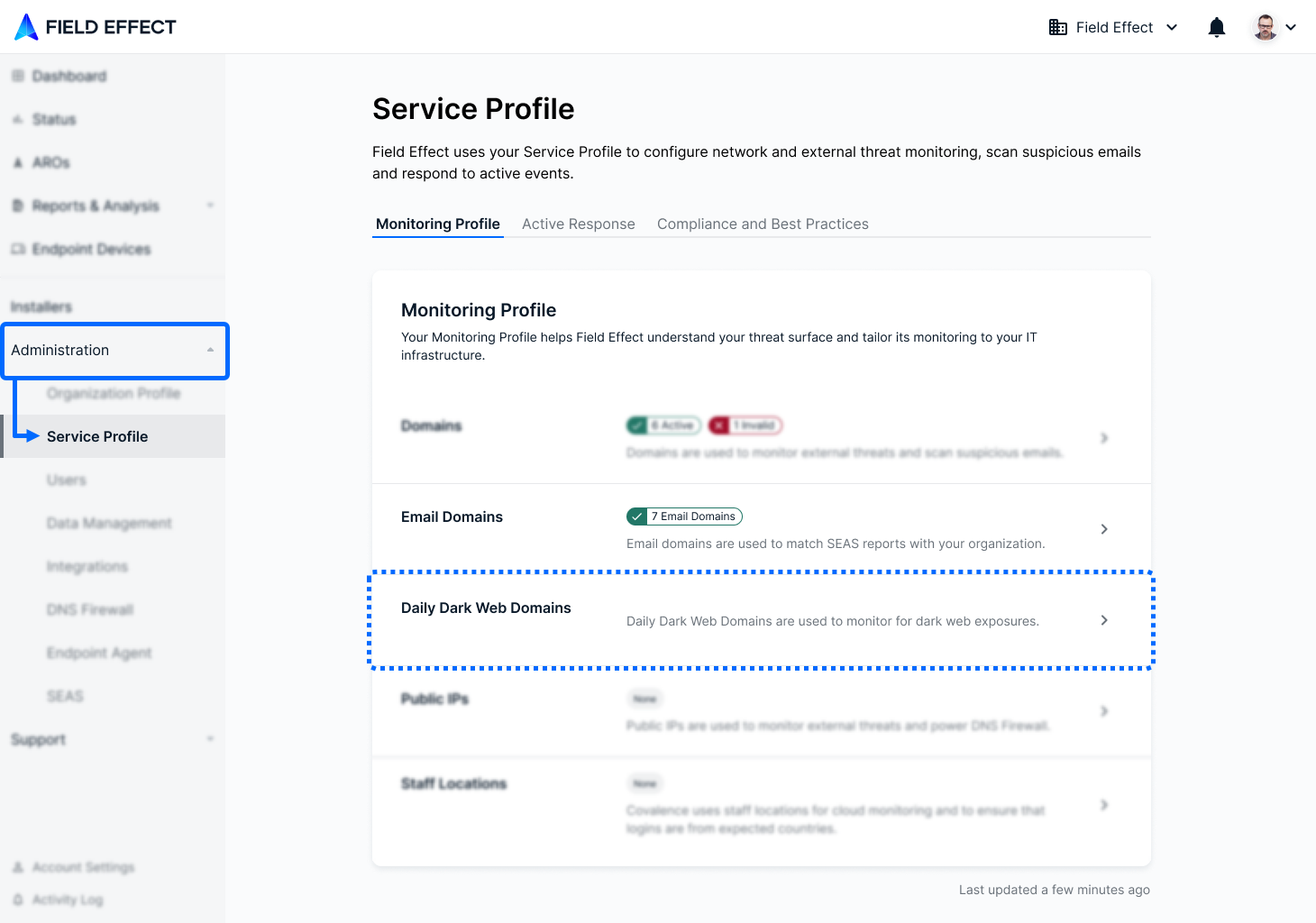
Navigate to Administration > Service Profile and ensure that the email domains you want to use for dark web monitoring have been added as Email Domains. When ready to choose Daily Dark Web Domains, click the section.
The Daily Dark Web Domains window will open. Use the search bar to select the domains you want monitored and click Update to confirm your changes.
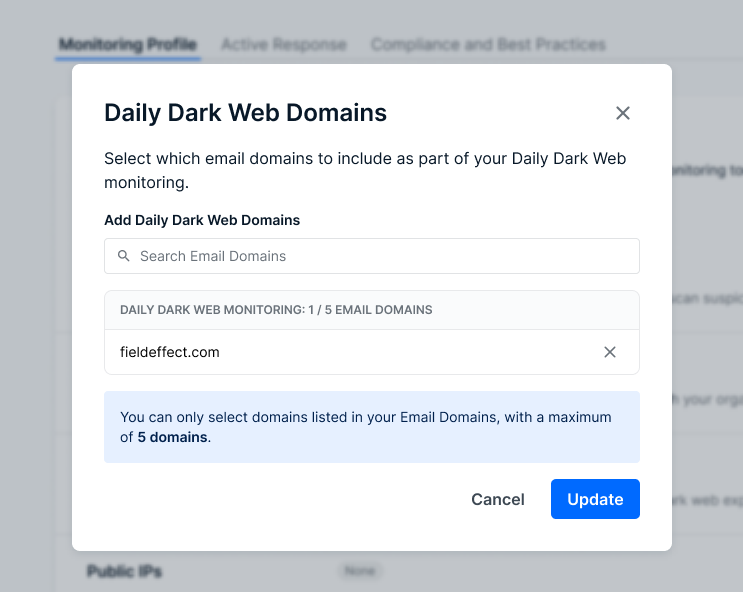
At this point, your domains have been designated for Dark Web Monitoring, and any exposures discovered during the daily scans will be brought to your attention via ARO.
Partners: Identifying Clients with the Add-On
You can see which end clients have the add-on by visiting the Clients page. The Add-Ons column reports whether or not the client has the add-on.
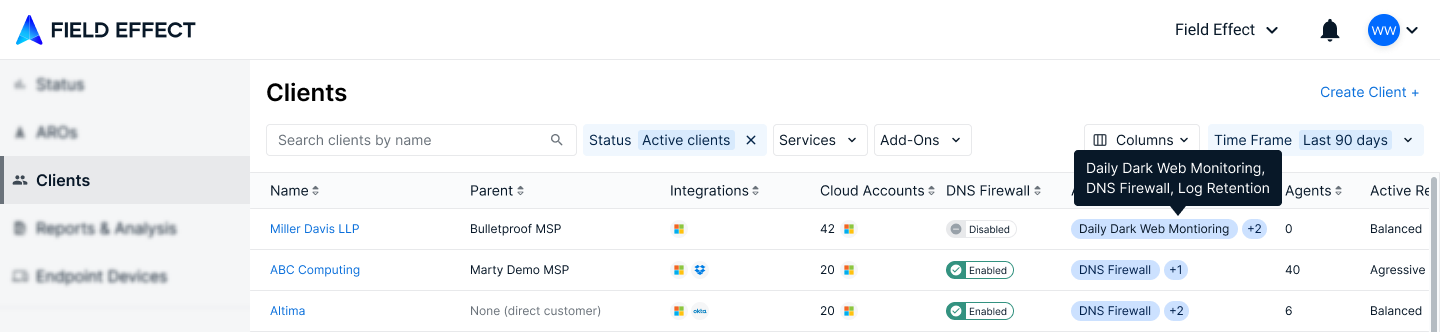
Mitigating Risks Associated with Exposed Data
Now that Daily Dark Web Monitoring is enabled, it’s imperative that you act on any findings to mitigate the risks associated with exposed data. We recommend the following methods:
Change Passwords for all Compromised Accounts
Enable multi-factor authentication on all accounts
Create, or enforce, policies that restrict users from using corporate email addresses for any non-work-related services.
Maintain strong password hygiene
Use a password manager
Enable active monitoring/blocking for suspicious login attempts
Implement human verification (captcha) authentication
Actively monitor for exposed information
Was this article helpful?
That’s Great!
Thank you for your feedback
Sorry! We couldn't be helpful
Thank you for your feedback
Feedback sent
We appreciate your effort and will try to fix the article