When installing Field Effect on your endpoint and your receive the error "Missing License File.", Field Effect has not been able to locate the "license.txt" file in the expected location.
The installer will look for the existence of a file named "license.txt" in the same folder as the installer. If it is unable to be located you will receive the following error.
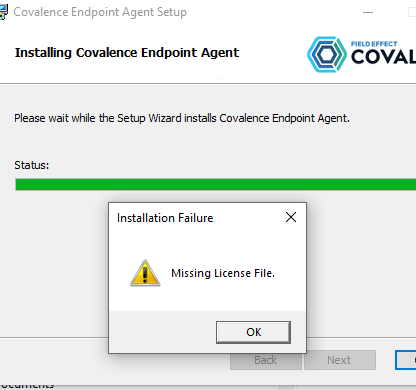
Step 1
Ensure you spelled the license file name correctly.
You must name the file "license.txt". We have encountered cases where the file has been manually renamed to "licence.txt" causing the installation to fail.
Some Windows/Mac folder settings hide file extensions, and we've seen users inadvertently rename the file to "licence.txt.txt" while trying to resolve this issue.
Step 2
Check its location.
The license.txt file must be in the same location as the installer. Double-check that your installation routines reference the license.txt file at the correct path, and check whether they reference files relatively or absolutely.
Step 3
Check the path to your files.
Ensure that the file path to your installer and license.txt file is using the basic latin/roman alphabet. Accented characters such as à, â, ç, é, è, ê, ë, î, ï, ô, ù, û, ü, ÿ will cause the installation to fail.
Step 4
If you continue to struggle with your installation we suggest you perform a manual uninstall
Was this article helpful?
That’s Great!
Thank you for your feedback
Sorry! We couldn't be helpful
Thank you for your feedback
Feedback sent
We appreciate your effort and will try to fix the article