Introduction
If you are a Field Effect partner, this page is available on a per-client basis only. Use the organization selector to select a client to access their Service Overview. If this page is not listed in your sidebar, the organization selector is set to your partner view.
The Service Overview is the MDR Portal's homepage for clients and visually summarizes all aspects of your MDR service; from the threat surfaces being monitored to all of your included services. There is also a section for features you may not be taking advantage of and how to enable these features for your organization.
This page communicates how our services are ingesting very your data and distilling it into actionable AROs or insights. If your organization is receiving few AROs, this page gives you an overview of the ongoing analysis that has been taking place.
If you are a Field Effect partner, you can choose whether this page is visible to end client users (and more) from the Client Configuration page.
This article covers the following:
Overview Video
This video provides a high-level look at the Service Overview page.
The Service Overview Sections
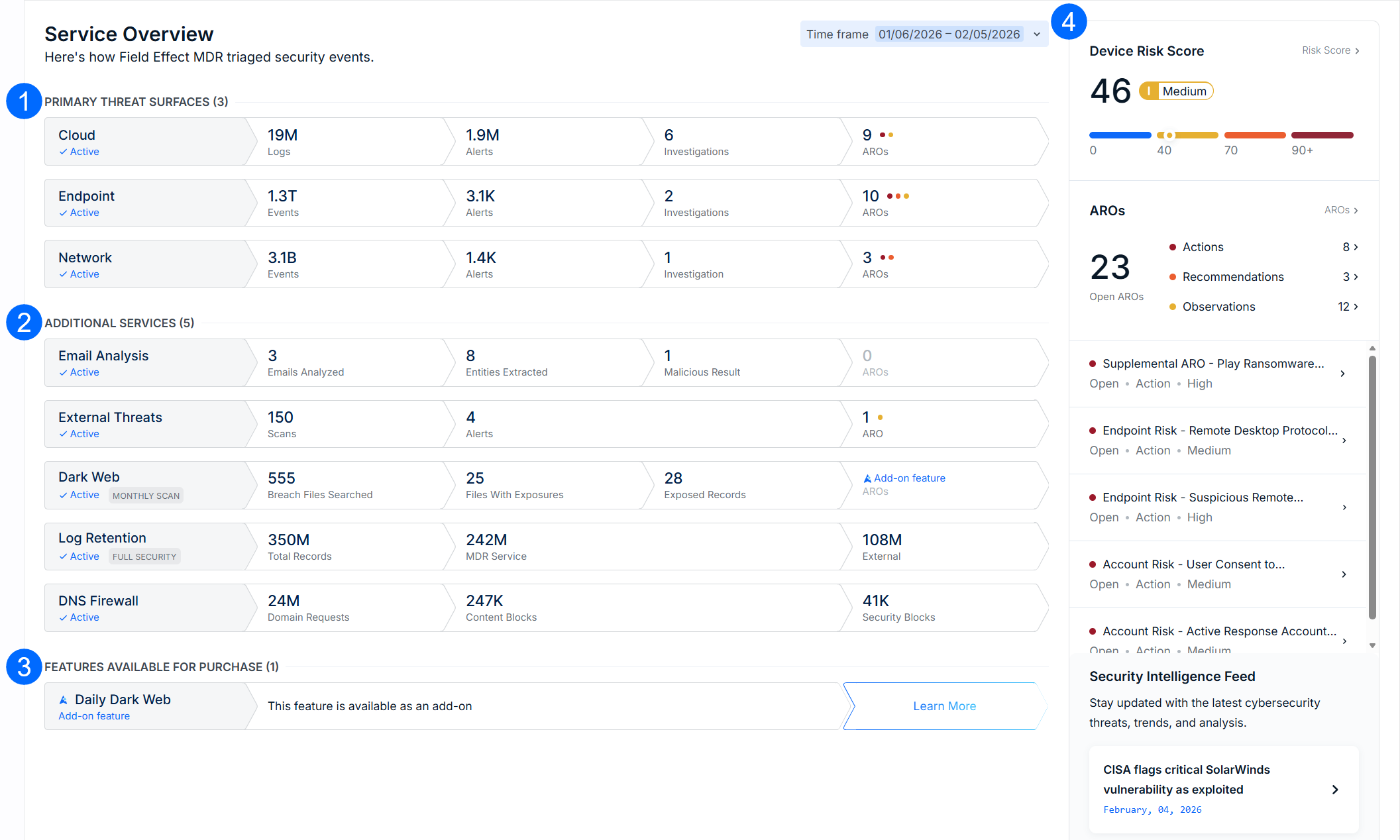
The Service Overview is made up of four sections:
Primary Threat Surfaces: details about our core monitoring services; Endpoint, Network and Cloud.
These are based on your service tier. If you are a Core client, for example, the Network threat surface will not be listed, since it's a part of the Complete service tier.
Additional Services: details around our additional services, and whether or not they are active. Any features you purchase in the future (Log Retention, Dark Web Monitoring) will be added to this section.
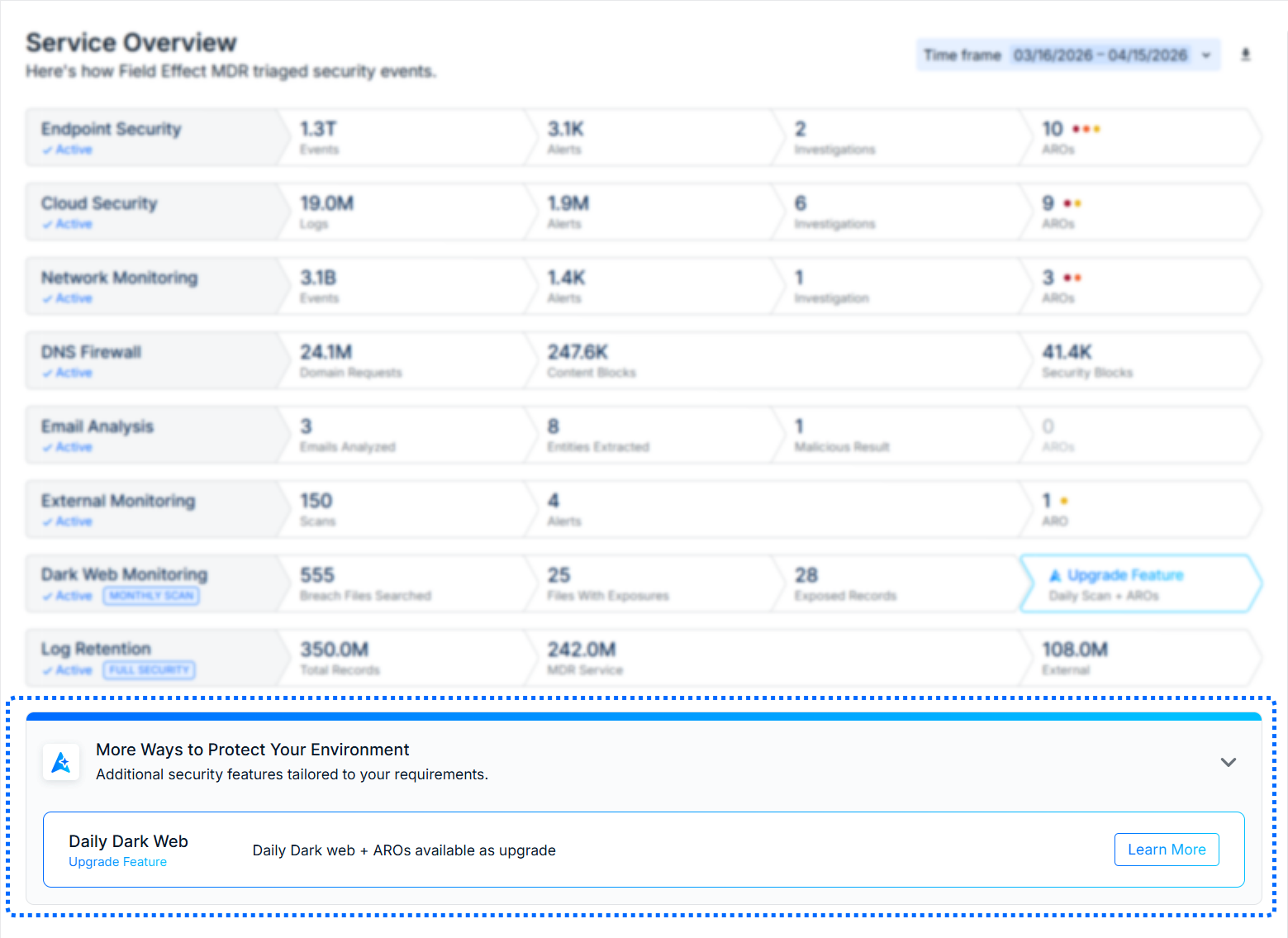
Services Available for Purchase: lists features and add-ons not being leveraged, but available to purchase.
If you are a Core client, services from the Complete service tier will be shown here, along with add-ons.
Details Pane: by default, this pane shows your organization's Device Risk Score.
When clicking on a section row (Primary Threat Surface or Additional Services) the details pane will show metrics related to the selected row. The following sections of this article explain the details pane behavior and metrics for each row.
Reading the Metrics
Each row can be understood as a "funnel" moving from left to right. The left most column communicates the total analysis of a service or feature. As the row moves to the right, it communicates the more severe aspects that were discovered and ends with any AROs that may have been issued.
Using the Endpoints row below as an example, Field Effect MDR analyzed 1.3 trillion events across all endpoints. That analysis generated 3.1 thousand alerts where generated, with 6 triggering an investigation. After the investigations, 10 AROs were issued. This is meant to communicate all the analysis that is performed before bringing issues to your attention via ARO.

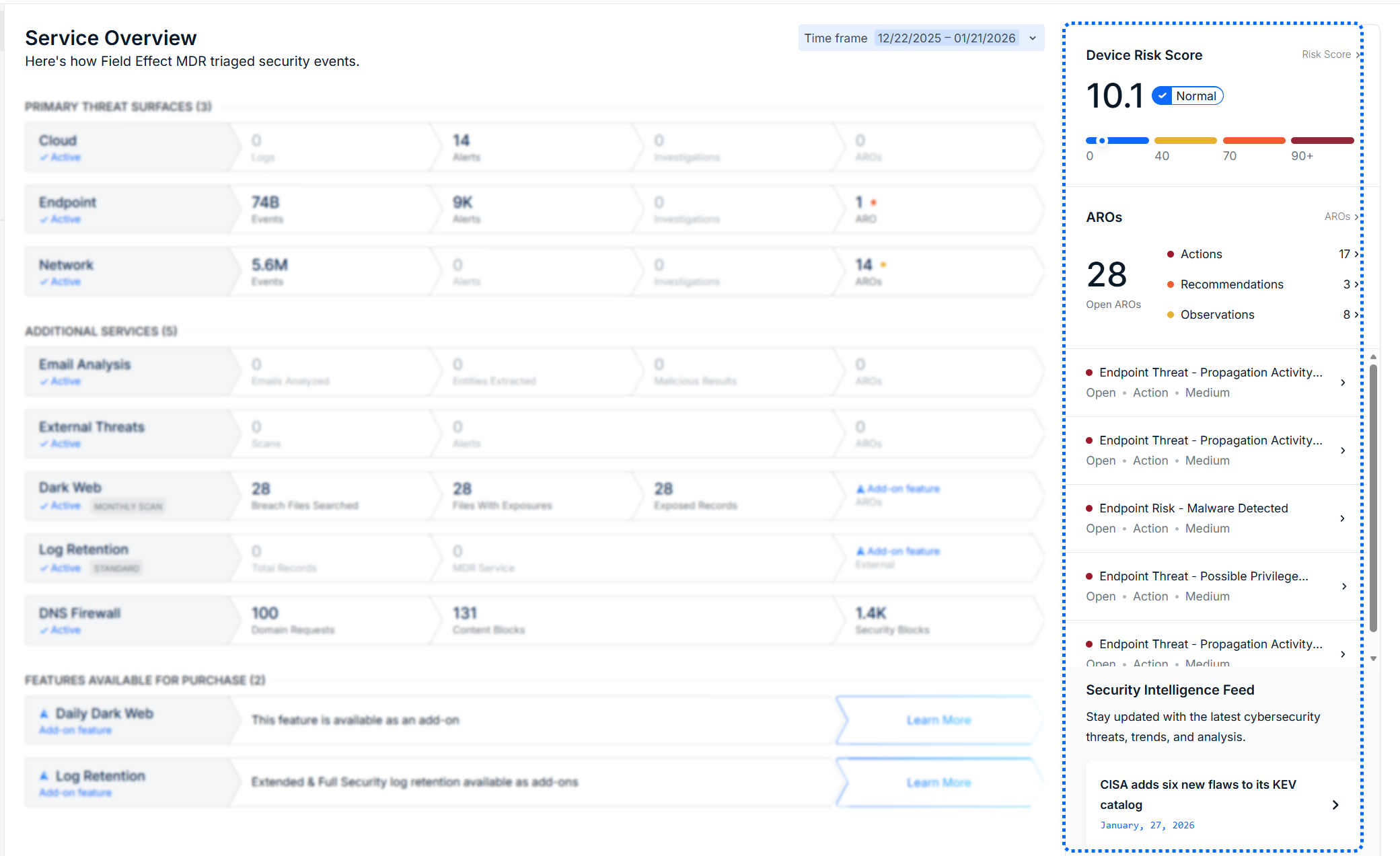
The Device Risk Score
When no row is selected, your organization's Device Risk Score will be shown in the right-hand details pane. As you click on an overview row, this Device Risk Score will be replaced with the details about the selected row.
Drilling into a Threat Surface or Feature
The following sections provide more information about the metrics found in each row of the Overview, as well as what is included on the section's details pane.
Primary Threat Surfaces
The following sections outline the metrics for each Threat Surface row, and what is shown on the details pane when that row is selected.
Cloud
| Metric | Description |
|---|---|
| Logs | The total number of cloud logs analyzed by Field Effect MDR. |
| Alerts | The number of alerts that were generated from the analyzed logs. |
| Investigations | The number of investigations performed against the generated alerts |
| AROs | The number of AROs that were generated, based on the analyzed logs, alerts and investigations |
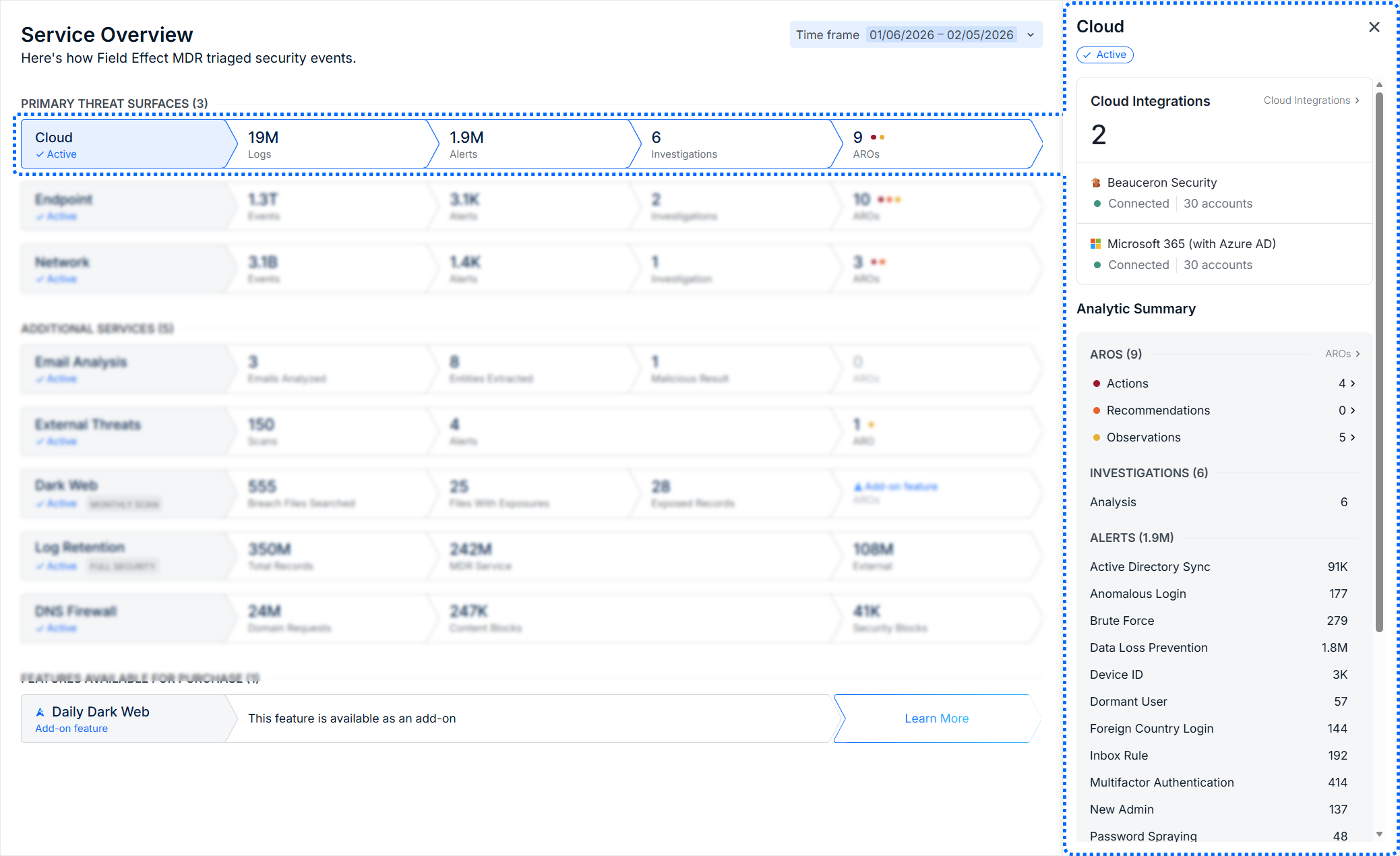
When the Cloud row is selected, the details pane shows all cloud services enrolled for monitoring, as well as the AROs affecting this threat surface, and the types of alerts or investigations associated with this threat surface.
Endpoint
| Metric | Description |
|---|---|
| Events | The total number of cloud events analyzed by Field Effect MDR. |
| Alerts | The number of alerts that were generated from the analyzed events. |
| Investigations | The number of investigations performed against the generated alerts. |
| AROs | The number of AROs that were generated, based on the analyzed logs, alerts and investigations. |
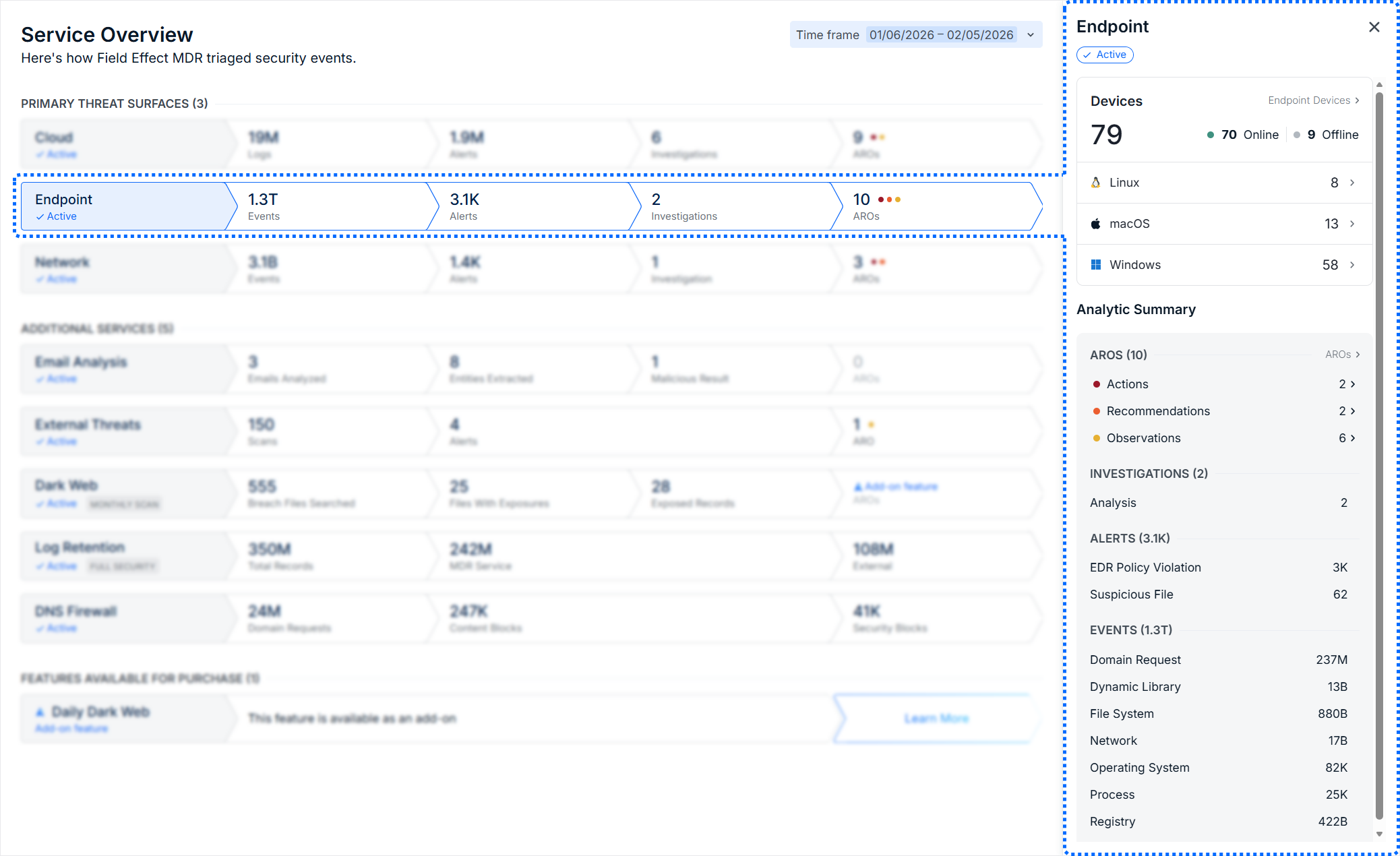
When the Endpoint row is selected, the details pane shows all of the devices with an endpoint agent installed, as well the operating systems in use. There is also an analytic summary that summarizes the AROs related to this threat surface, as well as the investigations and alerts.
Network
| Metric | Description |
|---|---|
| Events | The total number of network events analyzed by Field Effect MDR |
| Alerts | The number of alerts that were generated from the analyzed events. |
| Investigations | The number of investigations performed against the generated alerts. |
| AROs | The number of AROs that were generated, based on the analyzed logs, alerts and investigations. |
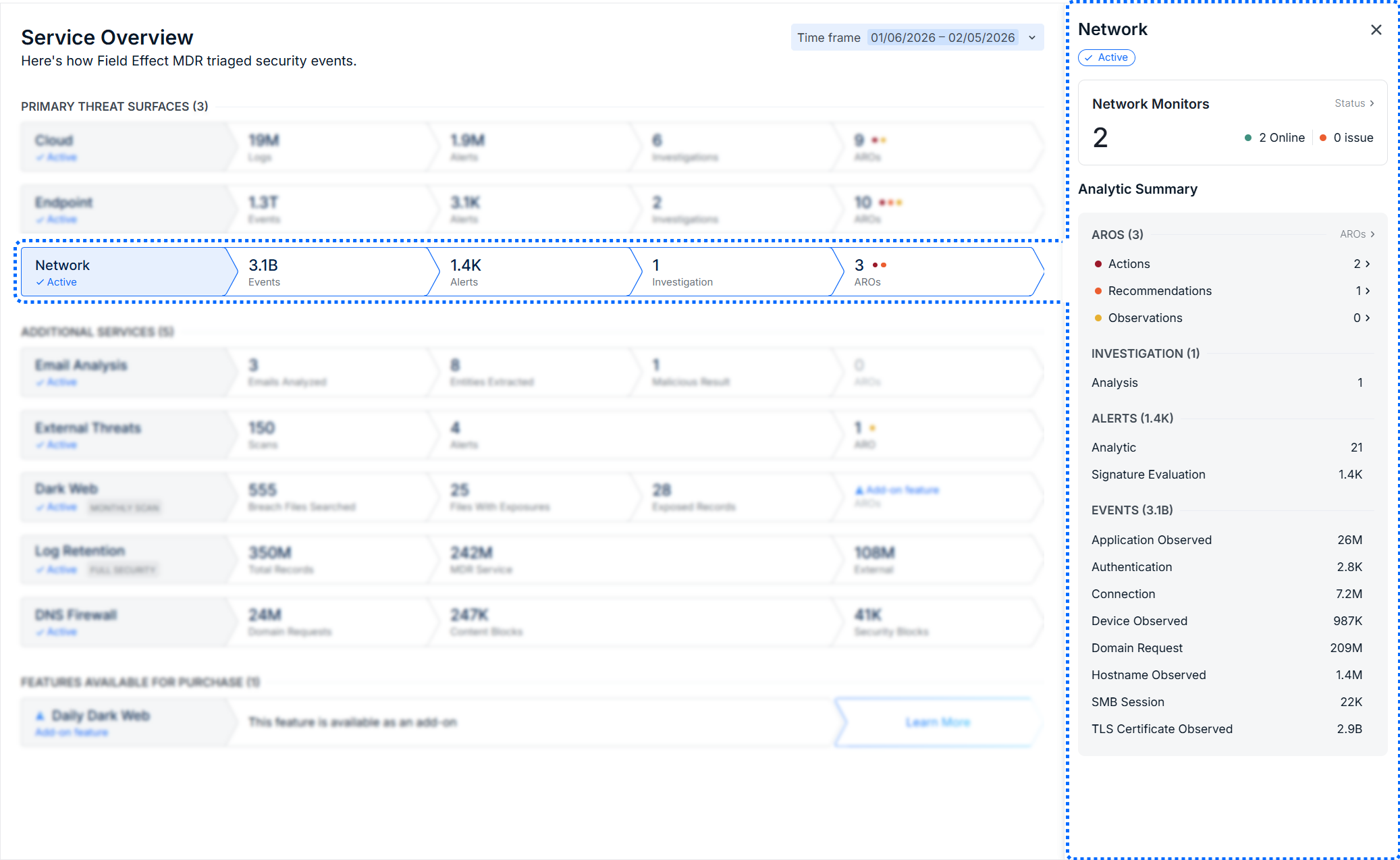
When the Network row is selected, the details pane shows all of network monitors (virtual or physical) and status markers monitors that are online or experiencing an issue. There is also an analytic summary that summarizes the AROs related to this threat surface, as well as the investigations and alerts.
Additional Services
The following sections outline the metrics for each Threat Surface row, and what is shown on the details pane when that row is selected.
Email Analysis
| Metric | Description |
|---|---|
| Emails Analyzed | The total number of emails analyzed by Field Effect MDR. |
| Entities Extracted | The number of entities that were from the analyzed emails. |
| Malicious Results | The number of emails that were given a malicious status. |
| AROs | The number of AROs that were caused by an email-related issue. |
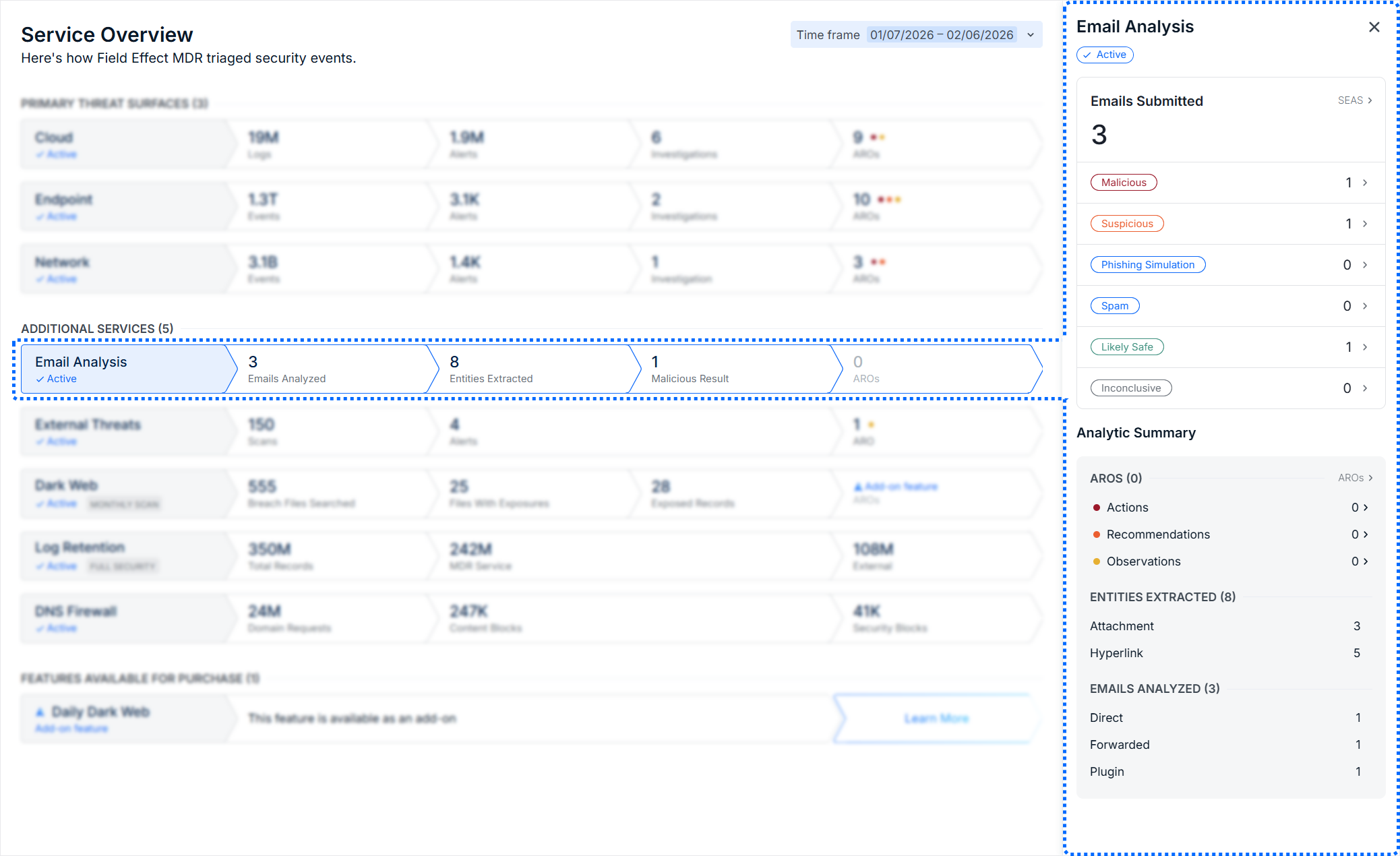
When the Email Analysis row is selected, the details pane shows a breakdown of your SEAS email submissions, grouped by status. There is also an analytic summary of AROs related to emails, as well as the number of entities extracted and emails analyzed.
External Threats
| Metric | Description |
|---|---|
| Scans | The total number of scans performed by Field Effect MDR across your monitored assets, which are the IP addresses and email domains added to your Service Profile. |
| Alerts | The number of alerts generated as a result of a scan. |
| AROs | The number of AROs issued based on the external threat alerts. |
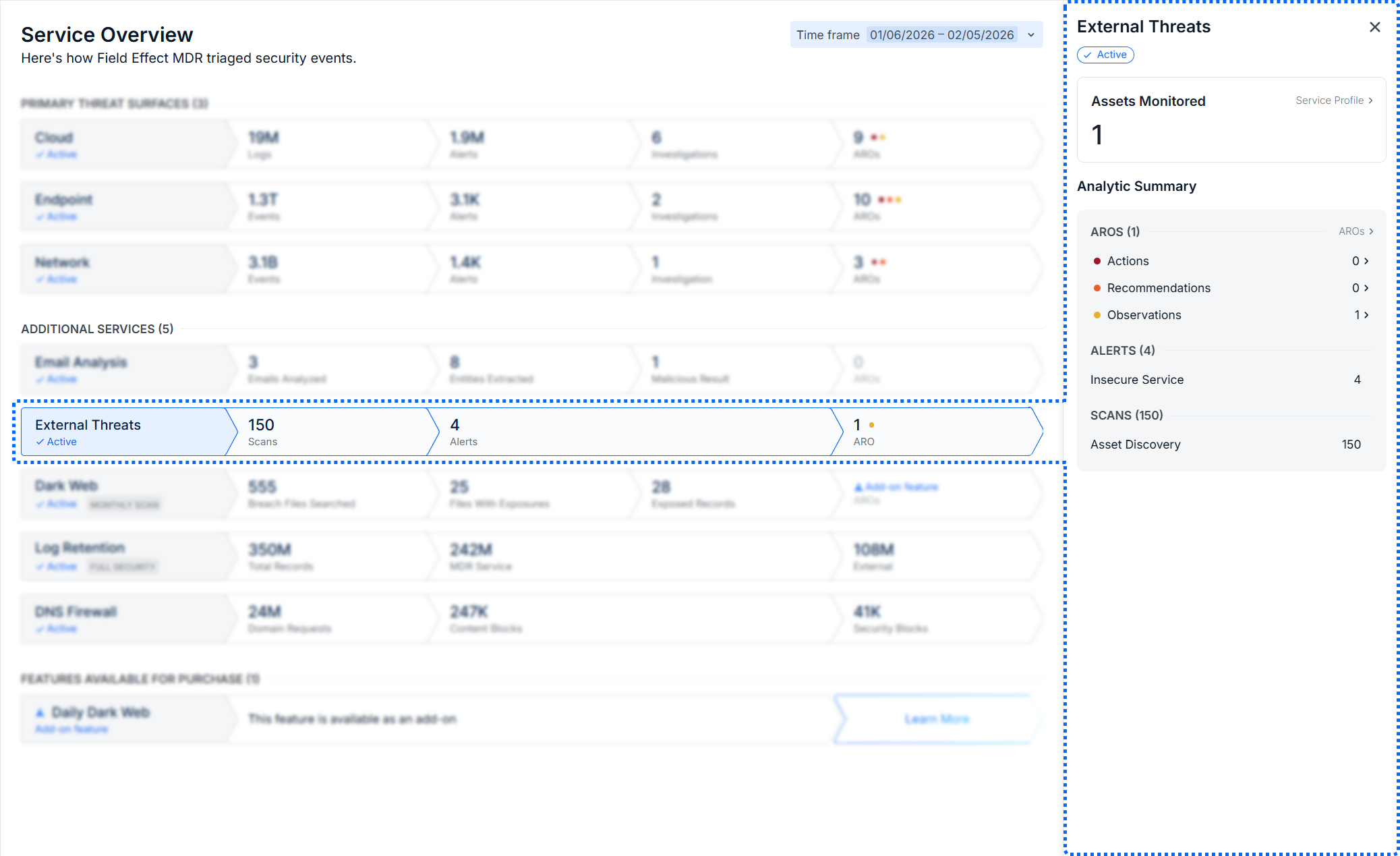
When the External Threats row is selected, the details pane shows the total number of assets being monitored, an analytic summary of related AROs, and the number of entities extracted and emails analyzed. Click on Service Profile to manage your assets, or an ARO type to see those AROs listed on the AROs page.
Dark Web
| Metric | Description |
|---|---|
| Breach Files Searched | The number of breach files that Field Effect MDR searched. |
| Files with Exposures | The number of breach files that contained exposures related to your organization. |
| Exposed Records | The number of exposures found across all breach files. |
| AROs | The number of AROs that were generated due to an exposure. |
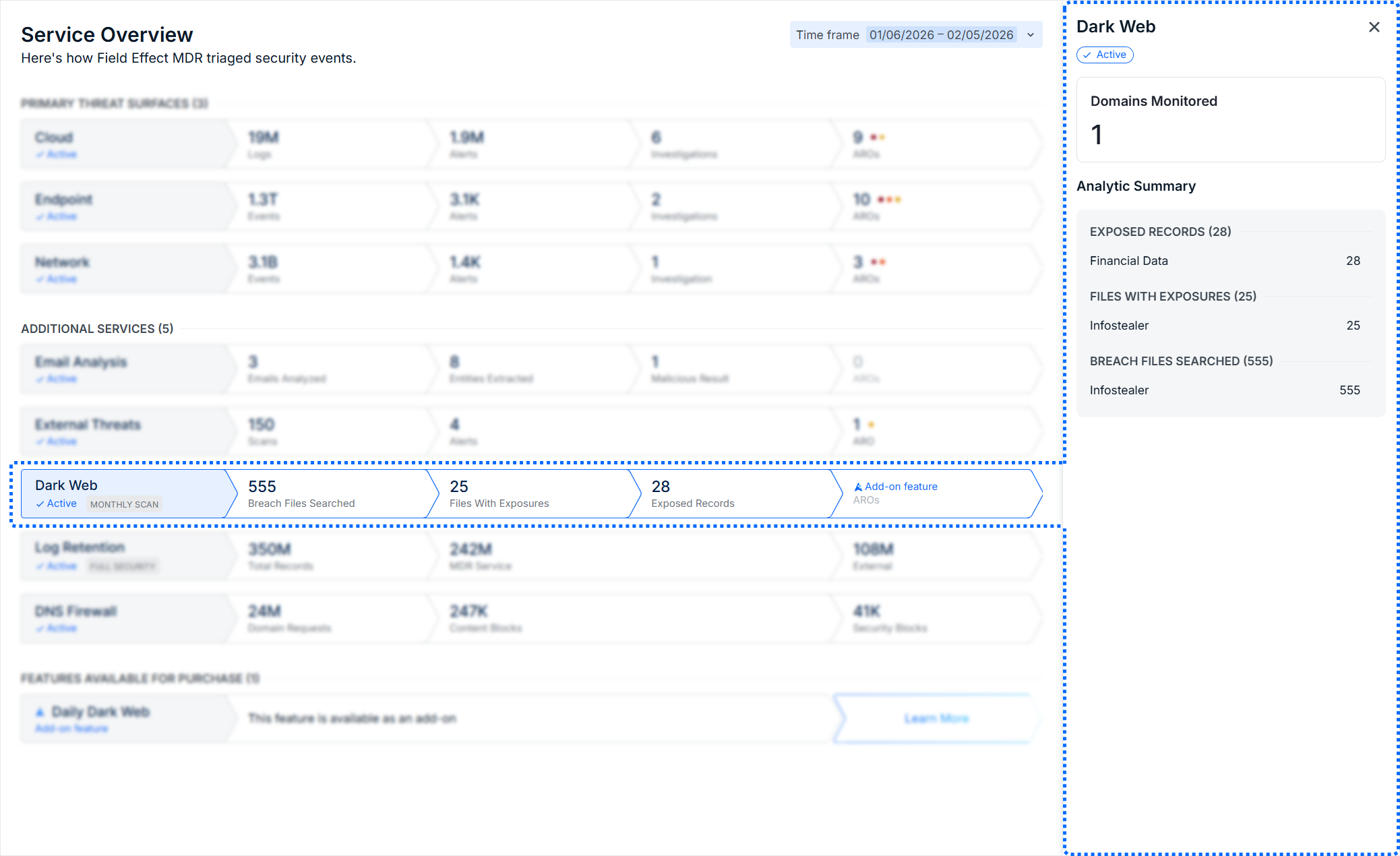
When the Dark Web row is selected, the details pane shows a breakdown of the domains being monitored (as per your Service Profile), and an analytic summary that tallies and categorized exposed records, files with exposures, and breached files searched.
Log Retention
| Metric | Description |
|---|---|
| Total Records | The total number of log records currently being stored. |
| MDR Services | The number of logs from the total representing the logs related to your MDR service. |
| External | The number of logs from the total representing any external logs you have configured. |
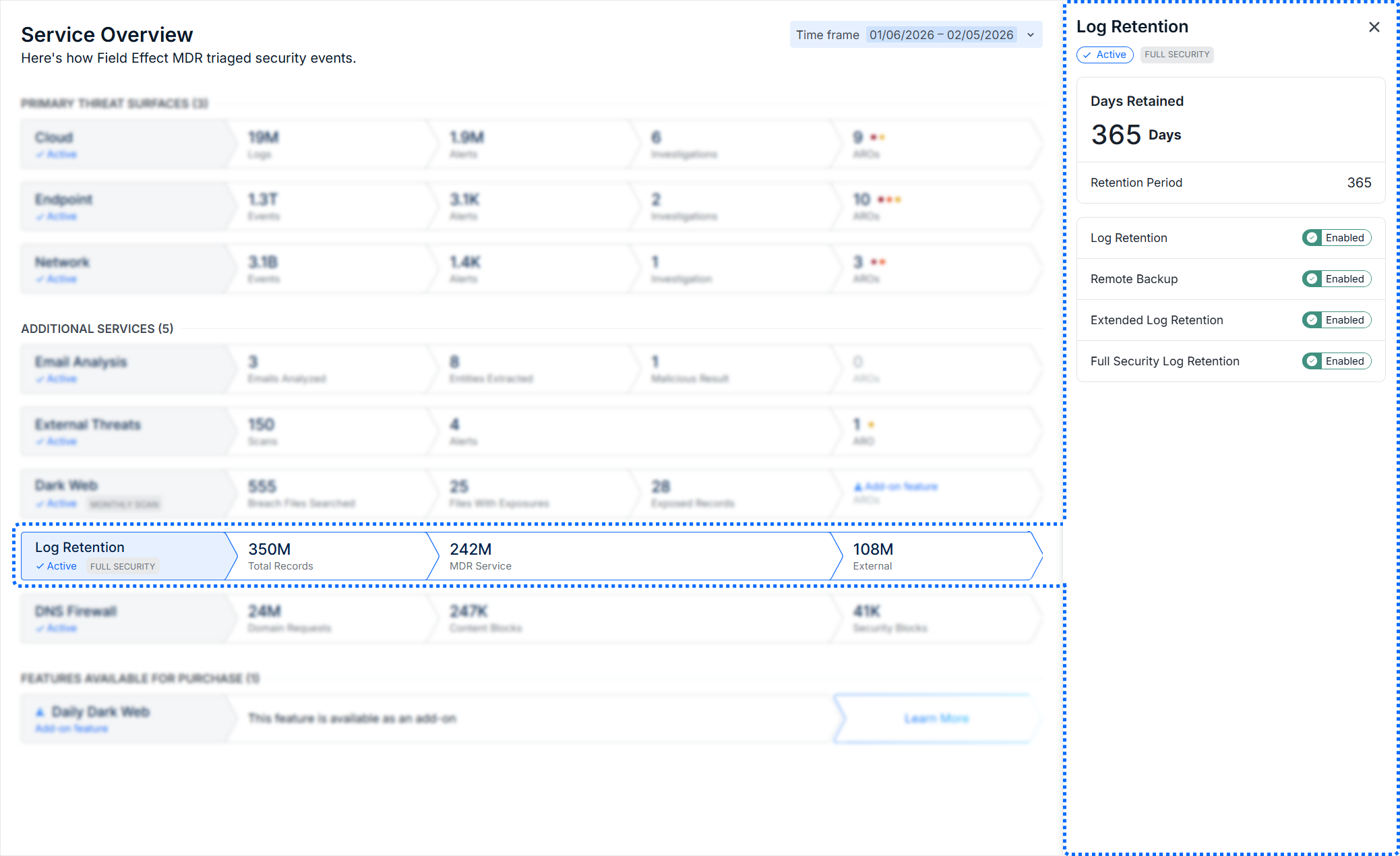
When the Log Retention row is selected, the details pane shows a breakdown the number of days currently retained and the full retention period. When starting log retention, the days retained metric will increase until you reach your retention period. At that point, retained logs outside of your retention period will be removed. There is also a status table for all the configurations and add on features for log retention.
DNS Firewall
| Metric | Description |
|---|---|
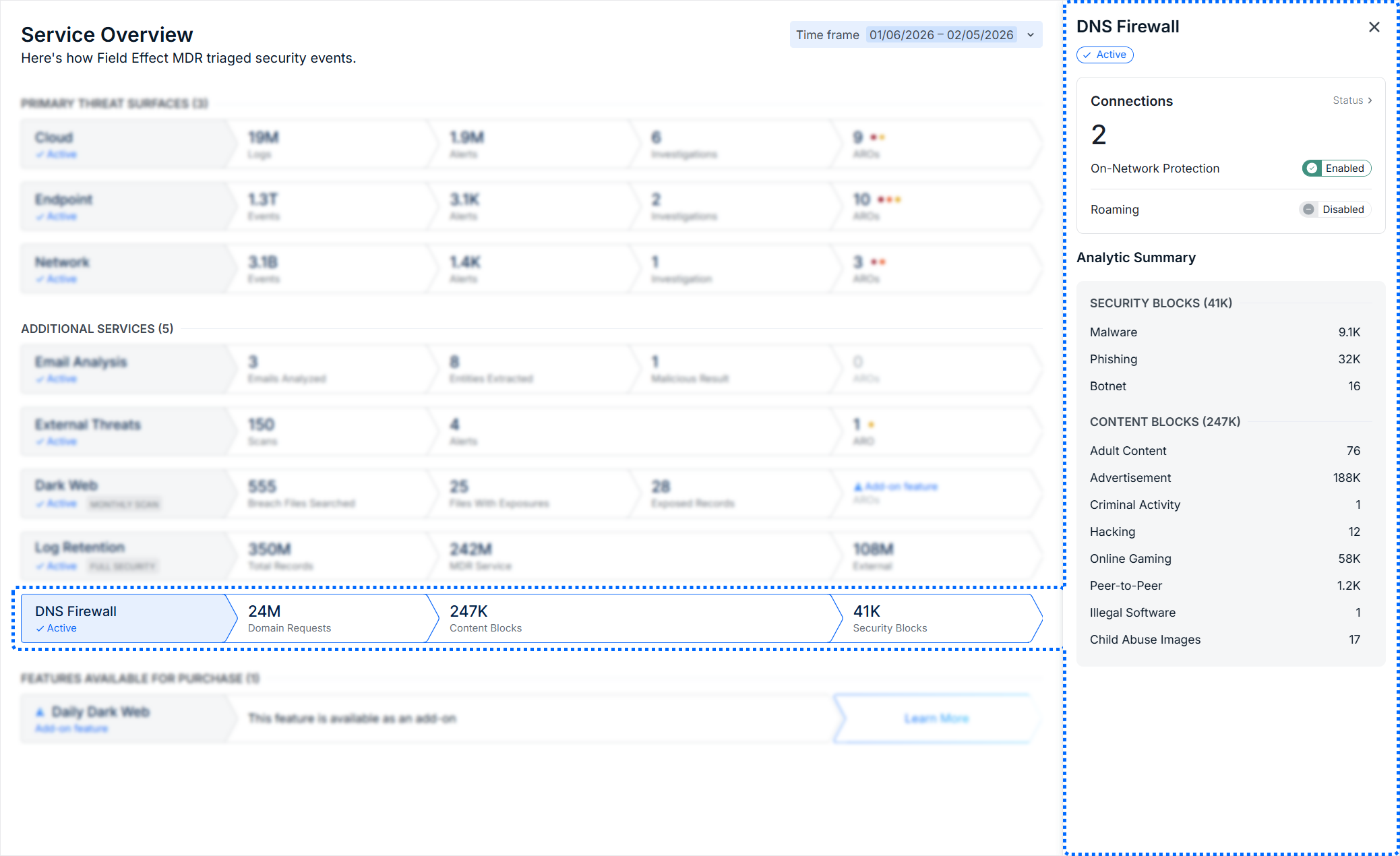
| Domain Requests | The total number of domain request made by users across all connections. |
| Content Blocks | Blocks that were made based on their content category (gambling, adult content, etc.) |
| Security Blocks | Blocks that were made based on a security concern. |
When this row is selected, the details pane shows a breakdown of connections being monitored (as set in your Service Profile's Public IPs section) the status of on network and roaming protection. There is also an analytic summary that tallies and organizes Security and Content blocks by category.
Partners: Managing the Add-On Features Section
If you are a Field Effect Partner, you can choose to disable the Features Available for Purchase section of this overview for your clients. If you would like to hide these additional services, please reach out to support@fieldeffect.com and we will disable the section.
Was this article helpful?
That’s Great!
Thank you for your feedback
Sorry! We couldn't be helpful
Thank you for your feedback
Feedback sent
We appreciate your effort and will try to fix the article