Introduction
If you need to contact our team for requests relating to the License Management Portal (LMP), you can do so from the navigation pane's Contact Us form. From here you can make change requests for a volume license customer: upgrading their service tier or adding another sensor to their deployment.
Procedure
After logging into the LMP, click Contact Us in the navigation menu.

The Contact Us form will appear on your screen. Begin by providing a reason for contacting us (1). After selecting a reason, select the customer you want to make changes to (2). Then, provide your message for our team and click Submit (4).
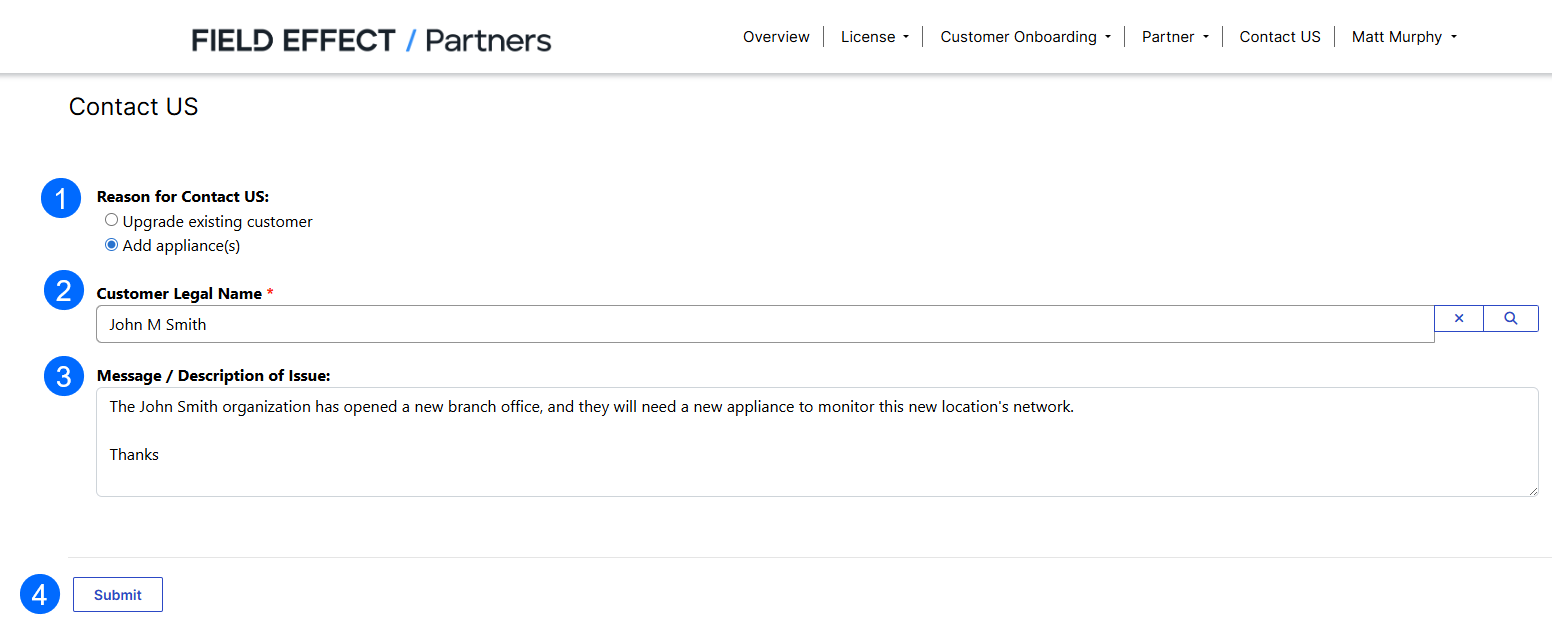
A notification informing you that the email was sent will be shown on your screen and our team will reply to you message and start actioning your request.
Was this article helpful?
That’s Great!
Thank you for your feedback
Sorry! We couldn't be helpful
Thank you for your feedback
Feedback sent
We appreciate your effort and will try to fix the article