Introduction
If you have an internal user that has left your organization, and you would like to remove your account from accessing the Field Effect Portal, you can do so from the User Management page.
This article walks through the procedure.
Procedure
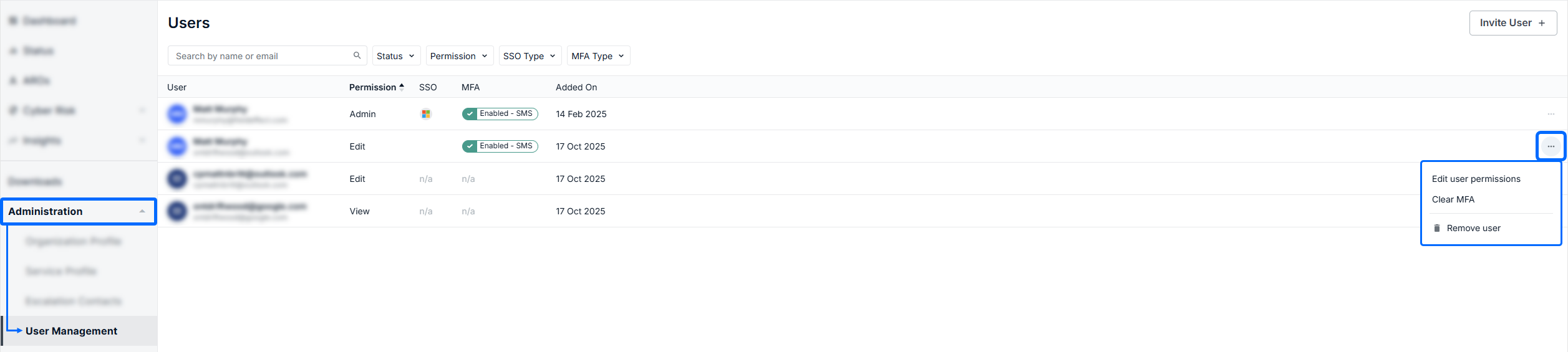
Once you locate the user in question in the table, click the ellipses for that user to open the management dropdown menu.
Click Remove user in the user’s ellipses to open Remove User window.
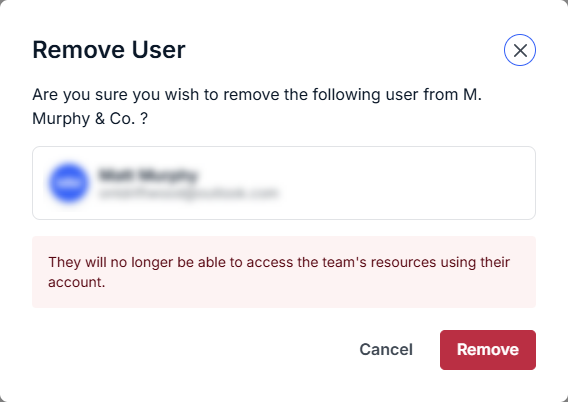
The Remove User window reiterates that they will no longer have access to the portal. Once you’re sure you want to remove the user, click Remove.
The MDR Portal returns you to the User Management page; the user table no longer lists the user, and they no longer have access to your organization in the portal.
Was this article helpful?
That’s Great!
Thank you for your feedback
Sorry! We couldn't be helpful
Thank you for your feedback
Feedback sent
We appreciate your effort and will try to fix the article