Introduction
This article walks through the steps for uninstalling and deleting the endpoint agent manually for:
Windows
The easiest method to uninstall the Windows Endpoint Agent is to uninstall the Windows App.
Guide: Uninstalling the Endpoint Agent - Windows
The steps below will walk you through what needs to be done to uninstall the Windows agent manually.
Stopping the services
Step 1 - Stop "Covalence Endpoint Service"
From the command line running as Administratorun:
sc queryex "Covalence Endpoint Service"
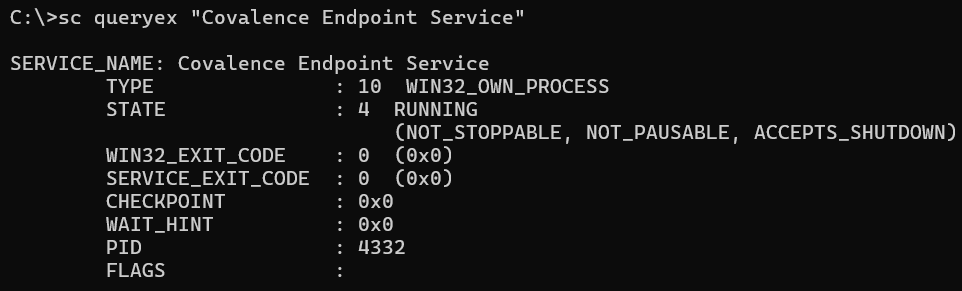
If the STATE is RUNNING
sc stop "Covalence Endpoint Service"
Step 2 - Stop CovAgent
From the command line running as Administrator, run:
sc queryex CovAgent
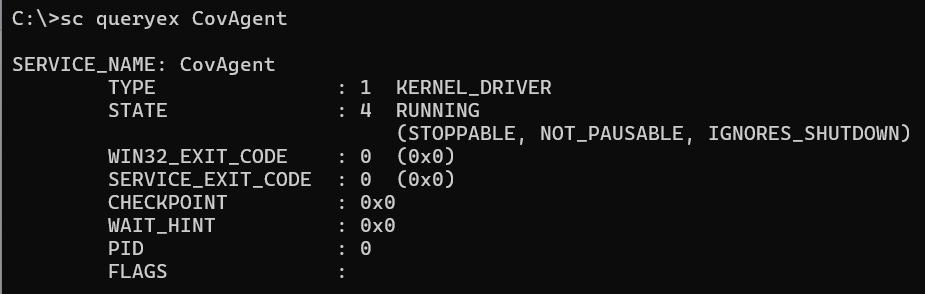
If the STATE is RUNNING
sc stop covAgent
Delete files from Disk
Delete the following from the disk:
- C:\Program Files\Field Effect
- C:\ProgramData\FieId Effect
- C:\Windows\System32\drivers\CovAgent.sys
Delete entries from the Registry
- HKEY_LOCAL_MACHINE\SOFTWARE\Field Effect
- HKEY_CLASSES_ROOT\Installer\Products**** (<- search via ctrl+f for ‘covalence’)
- HKEY_LOCAL_MACHINE\SYSTEM\CurrentControlSet\Services\CovAgent
- HKEY_LOCAL_MACHINE\SYSTEM\CurrentControlSet\Services\CovalenceEndpointService
- HKEY_LOCAL_MACHINE\SOFTWARE\Microsoft\Windows\CurrentVersion\Run\Covalence SysTray Launcher
- HKEY_LOCAL_MACHINE\SOFTWARE\Microsoft\Windows\CurrentVersion\Uninstall\**** (<- search via ctrl+f for ‘covalence’)
Delete the services
From the command line running as Administrator, run:
SC DELETE "Covalence Endpoint Service"
SC DELETE CovAgent
macOS
Use Launchpad to open Terminal and Run the following uninstall script:
Applications/Covalence.app/Contents/scripts/uninstall.sh


Next, you’ll be presented with a dialogue to enter your administrator password a second time. This is required to remove the Covalence System Extension. Enter your administrator password and click 'Ok' to continue.
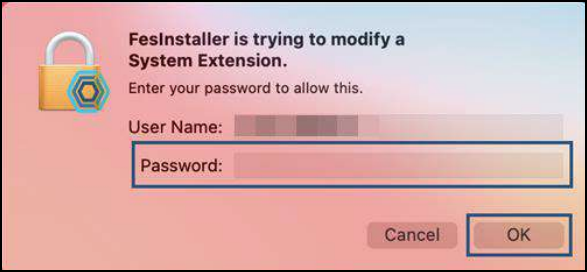
Once the script has completed, you will be returned to the command prompt. Covalence has now been uninstalled and you may close the Terminal application.

Linux
Debian
For uninstalling on Debian, run the following commands:
sudo dpkg -r covalence-endpoint-license
sudo dpkg -r covalence-endpoint
Redhat
For uninstalling on Redhead, run the following commands:
sudo rpm -e covalence-endpoint-license
sudo rpm -e covalence-endpoint
Was this article helpful?
That’s Great!
Thank you for your feedback
Sorry! We couldn't be helpful
Thank you for your feedback
Feedback sent
We appreciate your effort and will try to fix the article